Understanding Wiring Harness Diagrams: A Comprehensive Guide
Introduction
Wiring harness diagrams are essential blueprints in the world of electrical systems, serving as detailed roadmaps that illustrate how electrical components are interconnected. Whether in automotive, aerospace, industrial machinery, or consumer electronics, these diagrams provide technicians, engineers, and DIY enthusiasts with the visual information needed to install, troubleshoot, and repair complex electrical networks.
A wiring harness is an organized assembly of wires, connectors, and terminals that transmit electrical power and signals throughout a system. Unlike loose wires, a harness binds multiple conductors together with sleeves, conduits, or tape, providing protection against vibration, abrasion, and moisture. The
wiring harness diagram is the schematic representation of this assembly.
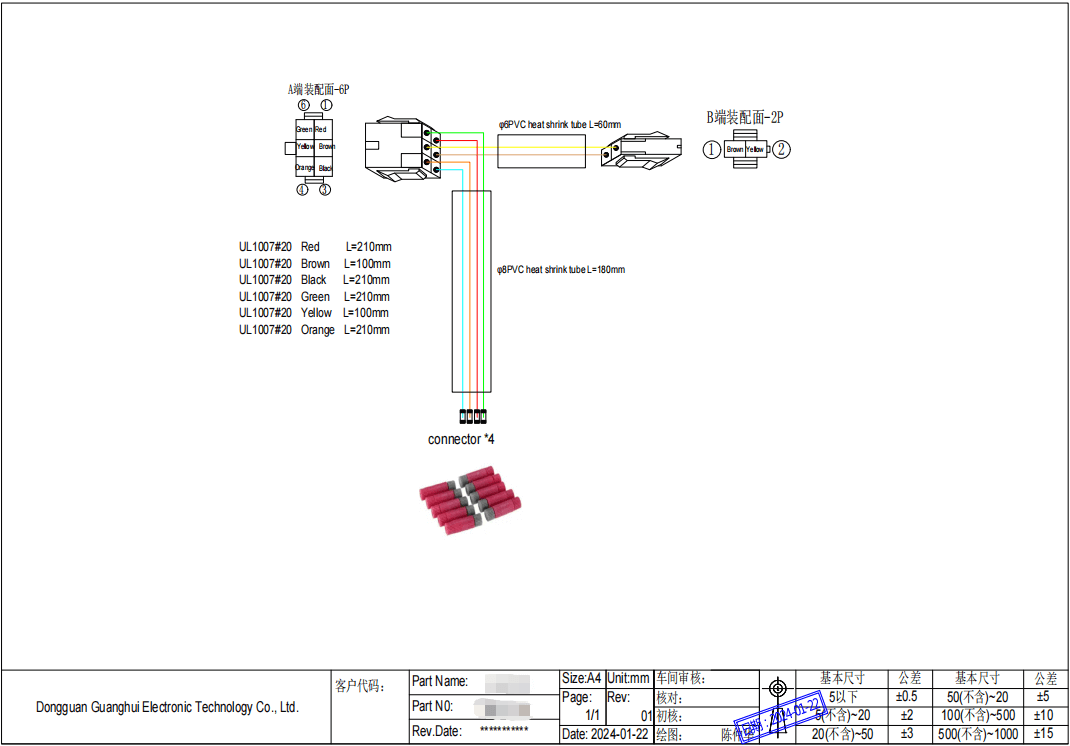
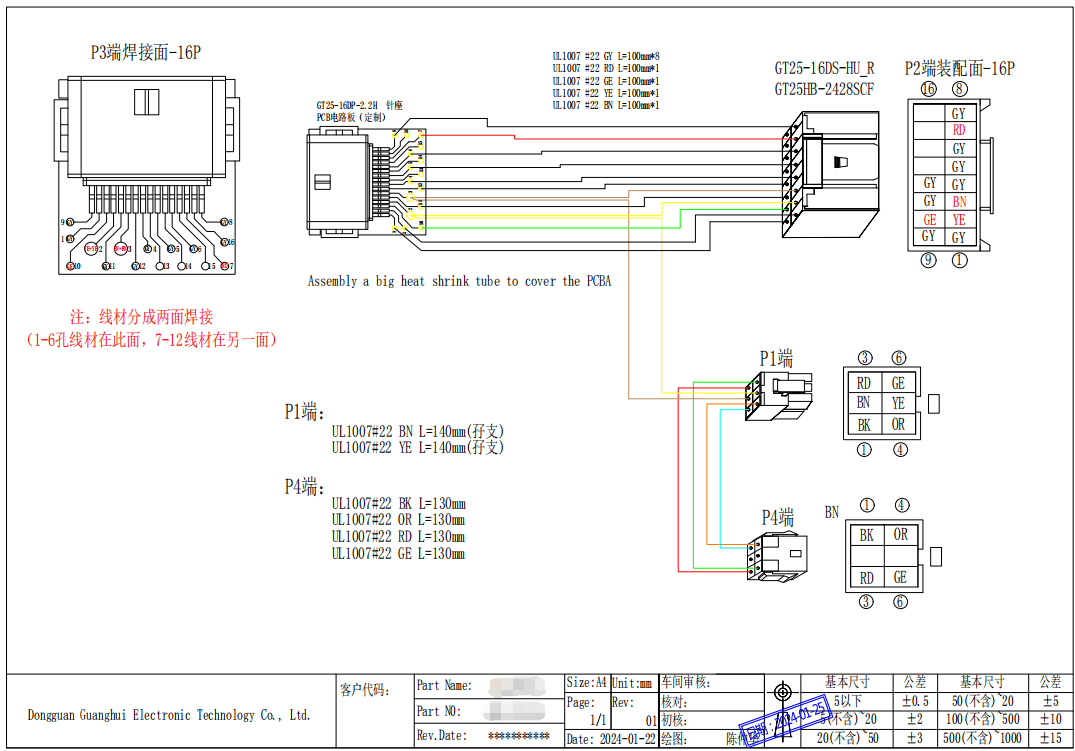
*Figure 1: A typical automotive wiring harness diagram showing color-coded wires, connectors, and component linkages.*
Key Components in Wiring Harness Diagrams
1. Wires and Color Coding
Wires are represented by lines, with colors indicated by abbreviations (e.g., BLK=Black, RED=Red, BLU=Blue). Color coding helps quickly identify wire functions:
Red: Typically power supply
Black/Ground: Ground connections
Blue/Yellow: Signal or accessory wires
2. Connectors and Terminals
Circles, rectangles, or specific symbols denote connectors where wires join. Labels such as "C102" or "J305" identify connector types and locations.
3. Components
Icons represent electrical components like sensors, switches, relays, and control modules. Each is labeled with part numbers or descriptive names.
4. Splices and Junctions
Dots or intersecting lines indicate where wires connect or split to multiple components.
5. Wire Gauge Markings
Numbers alongside wires (e.g., "0.5" or "2.0") indicate wire thickness in square millimeters, critical for current capacity.
Figure 2: Visual breakdown of key elements found in wiring harness diagrams.
How to Read a Wiring Harness Diagram
Step 1: Identify the Legend/Symbol Key
Most diagrams include a legend explaining symbols, color codes, and abbreviations.
Step 2: Follow the Circuit Path
Trace connections from power sources (battery, fuse box) through switches and components to ground points.
Step 3: Note Connector Details
Connector labels often correspond to physical locations in the system, with pin numbers specifying terminal positions.
Step 4: Understand Wire Routing
Dashed lines, arrows, or routing tables may indicate physical wire paths through the system.
Types of Wiring Harness Diagrams
1. Schematic Diagrams: Focus on electrical relationships without physical layout details.
2. Layout Diagrams: Show actual physical positioning of wires and components.
3. Pictorial Diagrams: Use realistic images of components for easier identification.
4. Block Diagrams: Provide high-level overviews of system interconnections.
Applications Across Industries
1. Automotive: Complex harnesses connecting engine controls, lighting, infotainment, and safety systems
2. Aerospace: Lightweight, high-reliability harnesses with rigorous documentation
3. Industrial Machinery: Robust harnesses for motors, sensors, and control systems
4. Consumer Electronics: Compact harnesses in appliances and computing devices
Benefits of Using Wiring Harness Diagrams
. Troubleshooting Efficiency: Quickly locate faults, shorts, or open circuits
. Installation Accuracy: Ensure correct connections during assembly
. Standardization: Maintain consistency across manufacturing and repairs
. Documentation: Provide reference for future modifications or diagnostics
Common Challenges and Solutions
|
Challenge |
Solution |
|
Complex, dense diagrams |
Use digital zoomable formats or breakdown into subsystem diagrams |
|
Varying symbol standards |
Always consult the specific diagram's legend |
|
Physical vs. schematic discrepancies |
Cross-reference with layout diagrams and physical inspections |
|
Color fading in older diagrams |
Use multimeter continuity testing to verify connections |
Digital Evolution: From Paper to Interactive Diagrams
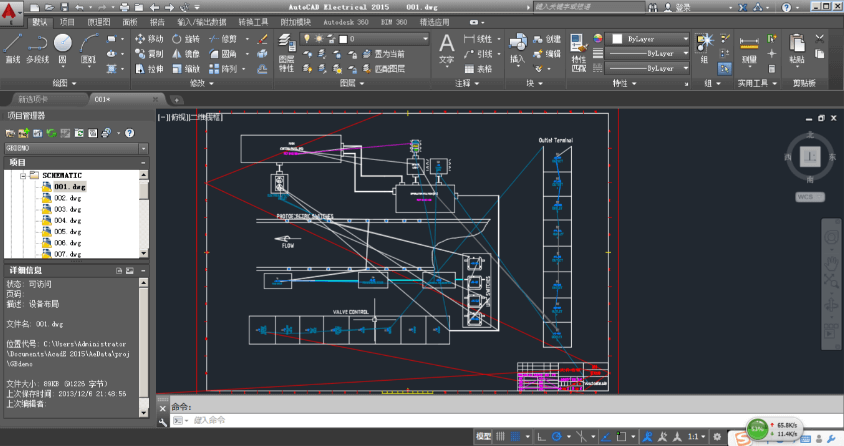
Modern wiring harness diagrams are increasingly digital and interactive. CAD software allows:
. 3D visualization of harness routing
. Clickable components revealing specifications
. Real-time collaboration for troubleshooting
. Integration with diagnostic tools
Figure 3: Modern interactive wiring diagram software with searchable components and zoom functionality.
Best Practices for Using Wiring Harness Diagrams
1. Always use the correct version specific to your system's model and year
2. Cross-reference multiple diagram types when available (schematic and layout)
3. Verify with physical inspection before making connections
4. Document modifications directly on the diagram for future reference
5. Use proper diagnostic tools like multimeters and test lights with diagram guidance
Conclusion
Wiring harness diagrams are more than just technical drawings—they are the language of electrical systems, translating complex interconnections into understandable visual formats. As systems grow more sophisticated, these diagrams continue to evolve, incorporating digital enhancements while maintaining their fundamental purpose: to provide clarity in complexity. Whether you're a professional technician or an enthusiastic hobbyist, mastering the interpretation of wiring harness diagrams is an essential skill for navigating the electrically-driven world around us.
Additional Resources
1. Industry Standards: SAE (Society of Automotive Engineers) wiring standards
2. Software Tools: AutoCAD Electrical, SolidWorks Electrical, VeSys
3. Training: Manufacturer-specific wiring diagram courses, electrical theory fundamentals
Dongguan Guanghui Electronic Technology Co., Ltd. is a high-tech enterprise specializing in wire harnesses and cable assemblies, with more than 19 years of R&D experience. We can provide better economic solutions and innovative wiring harnesses for many industries, such as automotive, machinery, medical, electrical, communications and other cable assemblies. With the support of R&D engineering, we focus on turnkey solutions. Support OEM/ODM. Welcome to contact with us!